CURRENT FLOW
Follow DC current through traces, vias and planes from source to load.
VOLTAGE DROP
See rail voltage fall across real copper resistance, point by point.
CURRENT DENSITY
LOWMEDHIGH
Spot neck-downs and via clusters where current concentrates.
Product tour
See PDN Analyzer in action.
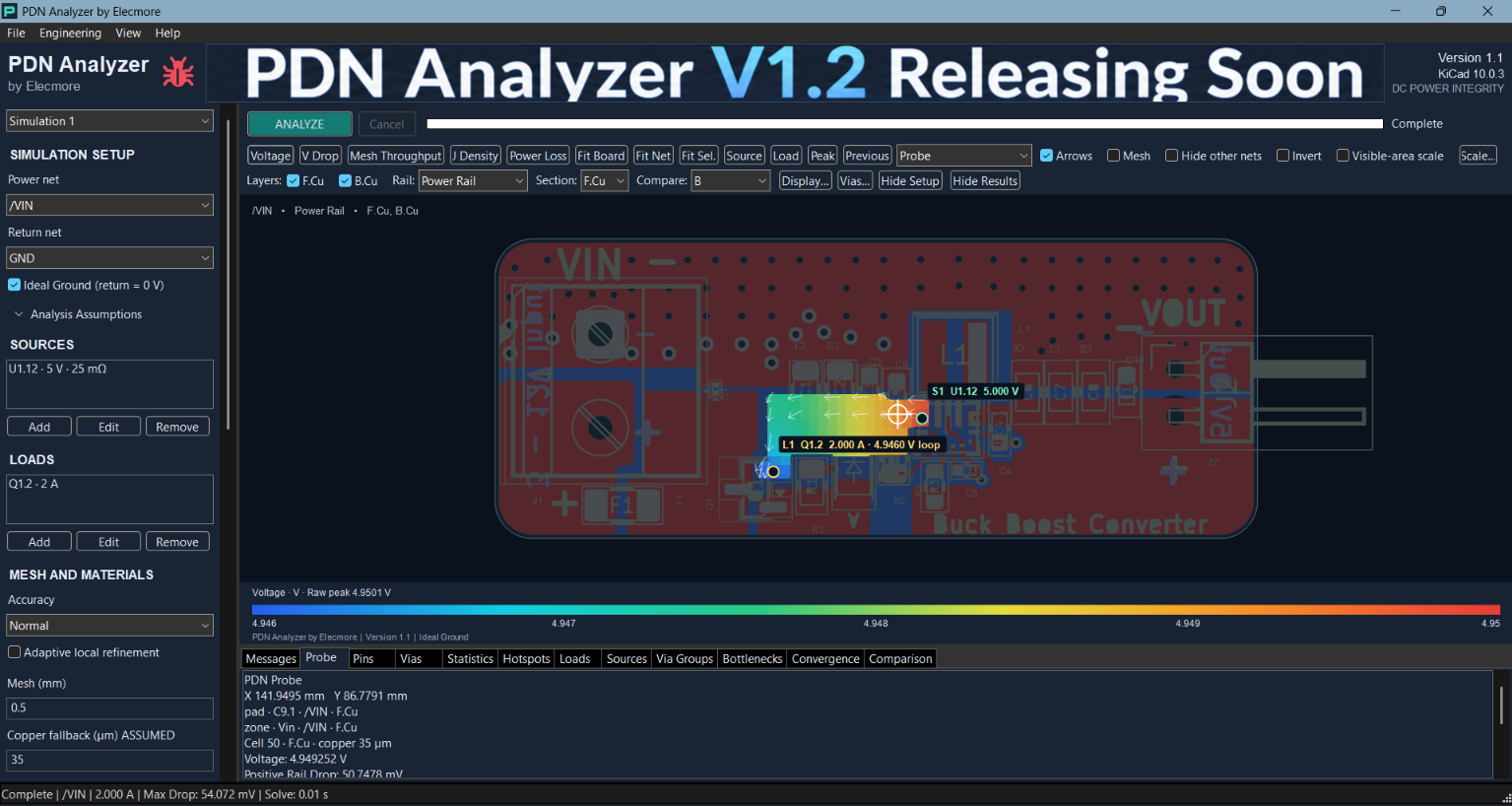
Analyze your KiCad PCB and visualize DC power distribution directly across the board.
Capabilities
DC power integrity, on your actual board.
Steady-state DC PDN analysis for PCB engineering: mesh the real copper, solve, and read the results where they happen.
VOLTAGE ANALYSIS
View rail voltage across real PCB copper geometry.
VOLTAGE DROP
Identify where resistance is causing excessive rail loss.
CURRENT DENSITY
See how current concentrates through traces, neck-downs, vias and planes.
POWER LOSS
Locate areas where resistive losses are highest.
RETURN PATH ANALYSIS
Analyze finite ground/return behavior rather than assuming an ideal ground plane.
PCB VISUALIZATION
Overlay engineering results directly on board geometry.
PROBE & LOCATE PEAK
Inspect values at individual board locations and quickly locate worst-case areas.
REPORTS & EXPORTS
Export useful engineering results — reports, CSV and PNG — for review and documentation.
Screenshots
Designed around your actual PCB.
Click a screenshot to enlarge
How it works
Three steps to a result.
01
Open your PCB in KiCad
Open the board in the KiCad 10 PCB Editor as usual.
02
Launch the plugin
Tools → External Plugins → PDN Analyzer by Elecmore.
03
Analyze and inspect
Define sources and loads, run the analysis and inspect the results on the board.
Free Public Beta
Help shape v1.1.
PDN Analyzer v1.1 is currently available as a free Public Beta. Install it on real designs and tell us what to improve: bugs, feature requests, general feedback, or help and questions.
Inside PDN Analyzer, click the red bug icon to send feedback directly to Elecmore. Optional diagnostics start unchecked, and your PCB data stays on your computer.
Download
PDN Analyzer by Elecmore
v1.1.0 Public Beta · Windows 11 & Windows 10 x64 · Tested with KiCad 10.0.6 x64
Windows 11
PDN Analyzer v1.1 for Windows 11
Tested on Windows 11 x64 with KiCad 10.0.6 x64
Download for Windows 11INSTALLER · 40.2 MB · WINDOWS 11 X64 · KICAD 10
Verify Download
The installer is not yet signed with a Windows Authenticode certificate. Download only from this page and check the SHA-256 of the file you receive:
45154597edf4234da4f7a87615733286aec939a12f0be7eb9b51389be5073ef9
SHA-256 · PDN-Analyzer-by-Elecmore-1.1.0-Setup.exe · all checksums
Windows 10
PDN Analyzer v1.1 for Windows 10
Tested on Windows 10 x64 with KiCad 10.0.6 x64
INSTALLER · 40.2 MB · WINDOWS 10 X64 · KICAD 10 | ZIP · 46.3 MB
Verify Download
The installer is not yet signed with a Windows Authenticode certificate. Download only from this page and check the SHA-256 of the file you receive:
86b5f8ea393be9d3379852ee40c0711a15cbf12ed3f6e1bcd1ac27c01a189f8c
SHA-256 · PDN-Analyzer-by-Elecmore-1.1.0-Windows10-Setup.exe
Release Information
Help us improve PDN Analyzer. Found a bug, have a feature request, or need help? Inside PDN Analyzer, click the red bug icon and send your feedback directly to Elecmore.